OpenClaw: The Architecture Behind the Always-On AI

You message your assistant at 7am: "What's on my plate today?" Thirty seconds later, a summary lands in WhatsApp. You didn't open a laptop. You didn't launch an app. You texted, and the AI answered.
Later that afternoon, unprompted, it messages you: "Heads up, the PR you were waiting on just got approved. Want me to kick off the deploy?"
It feels like someone is sitting at a desk, watching your stuff, 24/7. But there's no model running in the background. No GPU spinning. No inference happening between your messages.
The "always-on AI employee" is real, but the architecture underneath is more practical (and cheaper) than most people assume.
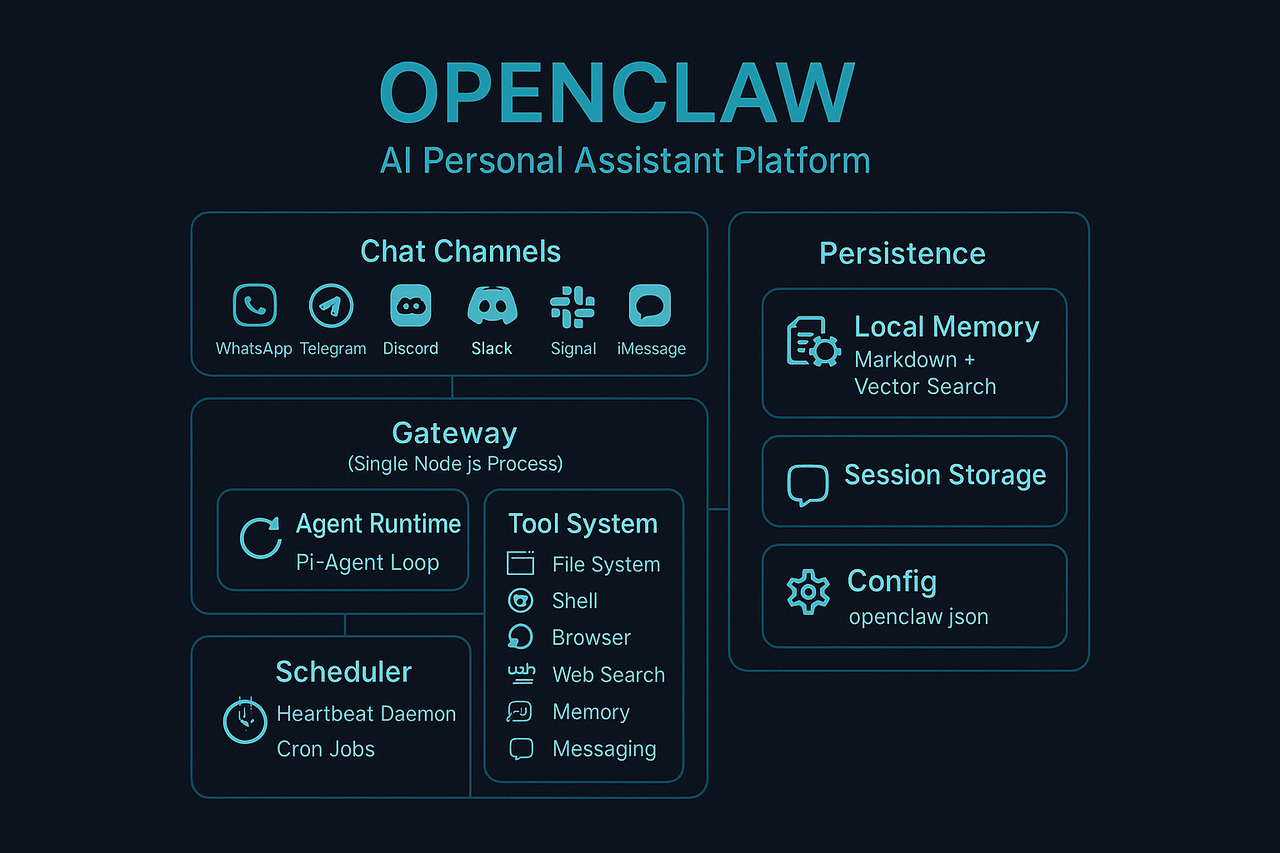
The core insight: OpenClaw isn't a single giant model running continuously. Instead, it uses an always-running orchestration layer that wakes the model up only when something needs to happen. The model is the brain. The Gateway is the nervous system.
The illusion vs the mechanism
You set up an OpenClaw agent and it feels like:
- "My assistant is working 24/7"
- "It checks on things and pings me when something matters"
- "It remembers everything about me across sessions"
- "It can reach me on WhatsApp, Telegram, Slack, wherever I am"
This creates the impression that an LLM is awake forever, burning tokens in a loop while staring at your inbox.
However, the reality is different. Understanding the gap between the feeling and the mechanism is the key to understanding the architecture.
The Gateway: a single Node.js process
The first thing to internalize: the Gateway runs continuously, while the model does not.
OpenClaw runs a Gateway daemon, a single Node.js process that stays up on your machine (or a server). Think of it as the operating system for your AI assistant. It's responsible for:
- Channel connections: maintaining live sessions with WhatsApp (via Baileys), Telegram (via grammY), Discord, Slack, Signal, iMessage, and more. All simultaneously, from one process.
- Routing: deciding which inbound message goes to which agent session, and which outbound message goes to which channel.
- Scheduling: running heartbeats and cron jobs on a timer.
- Tool orchestration: providing the agent with file system access, shell execution, browser control, web search, and memory tools.
- Streaming: chunking long model responses into readable messages and streaming them back to your chat app.
The Gateway is the component that remains online. It makes the assistant feel present, but it's lightweight and event-driven rather than compute-heavy. It sits idle most of the time, waiting for something to happen.
The LLM does not run continuously. It gets woken up, does its work, and goes back to sleep.
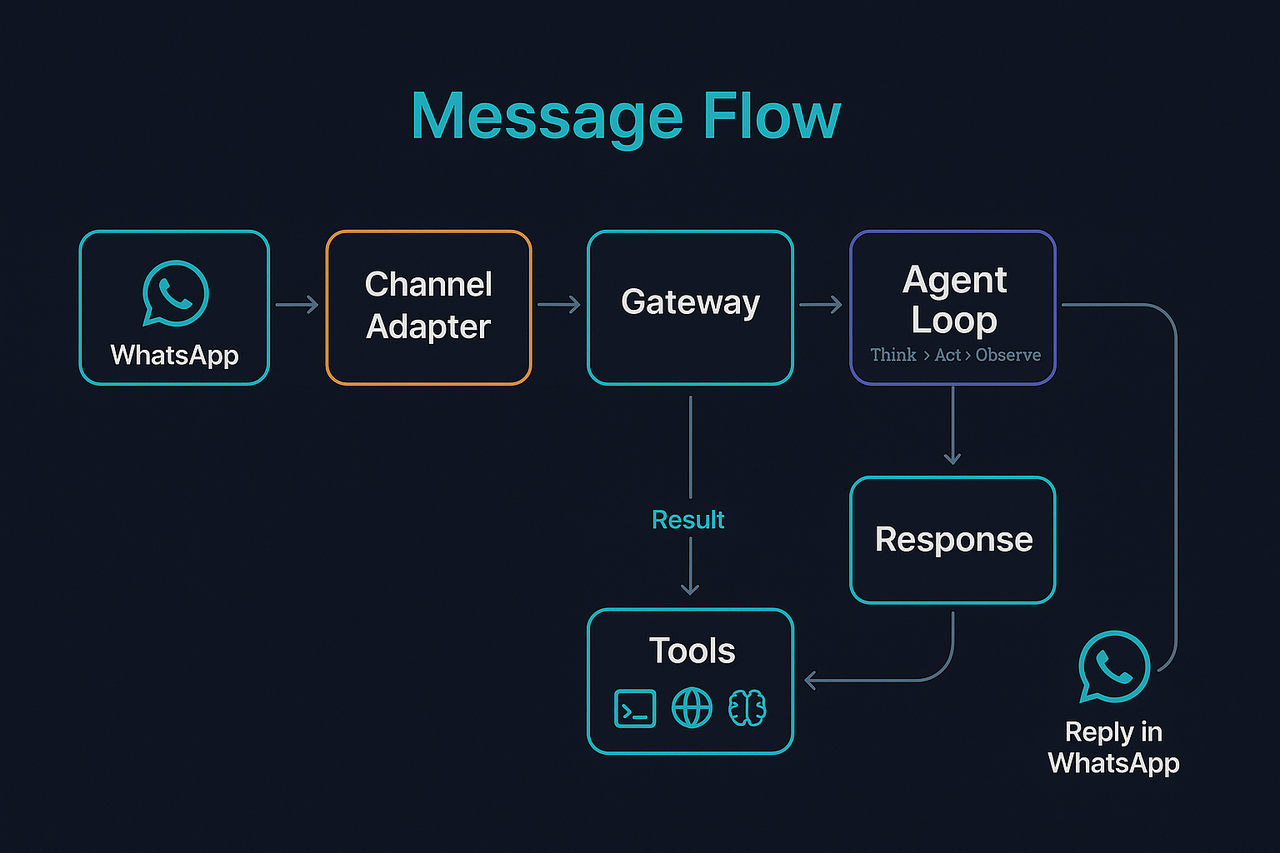
What a message actually looks like (end-to-end)
Let's trace a real interaction. You send "What meetings do I have tomorrow?" to your WhatsApp.
Step 1: Channel adapter. The Gateway's WhatsApp adapter (Baileys) receives the inbound message. It identifies the sender, matches them against the allowlist, and resolves the session key.
Step 2: Gateway routing. The message enters the Gateway's command queue. If the agent is already mid-turn on this session, the message is held (collected, steered in, or queued as a follow-up, depending on your queue mode config).
Step 3: Agent turn. The Gateway spins up an agent turn: it assembles the system prompt (including your AGENTS.md, SOUL.md, USER.md, and any loaded skills), injects the conversation history, and calls the model API.
Step 4: ReAct loop. The model runs its reasoning loop, the same Think > Act > Observe pattern we covered in our Claude Code deep dive. It might call a calendar tool, read a file, or search memory. Each tool call is executed locally by the Gateway, and the result is fed back into the conversation for the next iteration.
Step 5: Response. The model produces its final answer. The Gateway streams it back through the WhatsApp adapter, chunked into readable messages. You see the reply in your chat.
Step 6: Persistence. The full turn (your message, the model's reasoning, tool calls, and response) is appended to the session's JSONL transcript on disk.
The entire exchange was one agent turn, a bounded burst of model reasoning triggered by your message. Between turns, the model doesn't exist. Only the Gateway is running.
Heartbeat: the proactive illusion
This is the part that makes people think the AI is "watching things." Two mechanisms create the 24/7 feel: Heartbeat and Cron.
Heartbeat
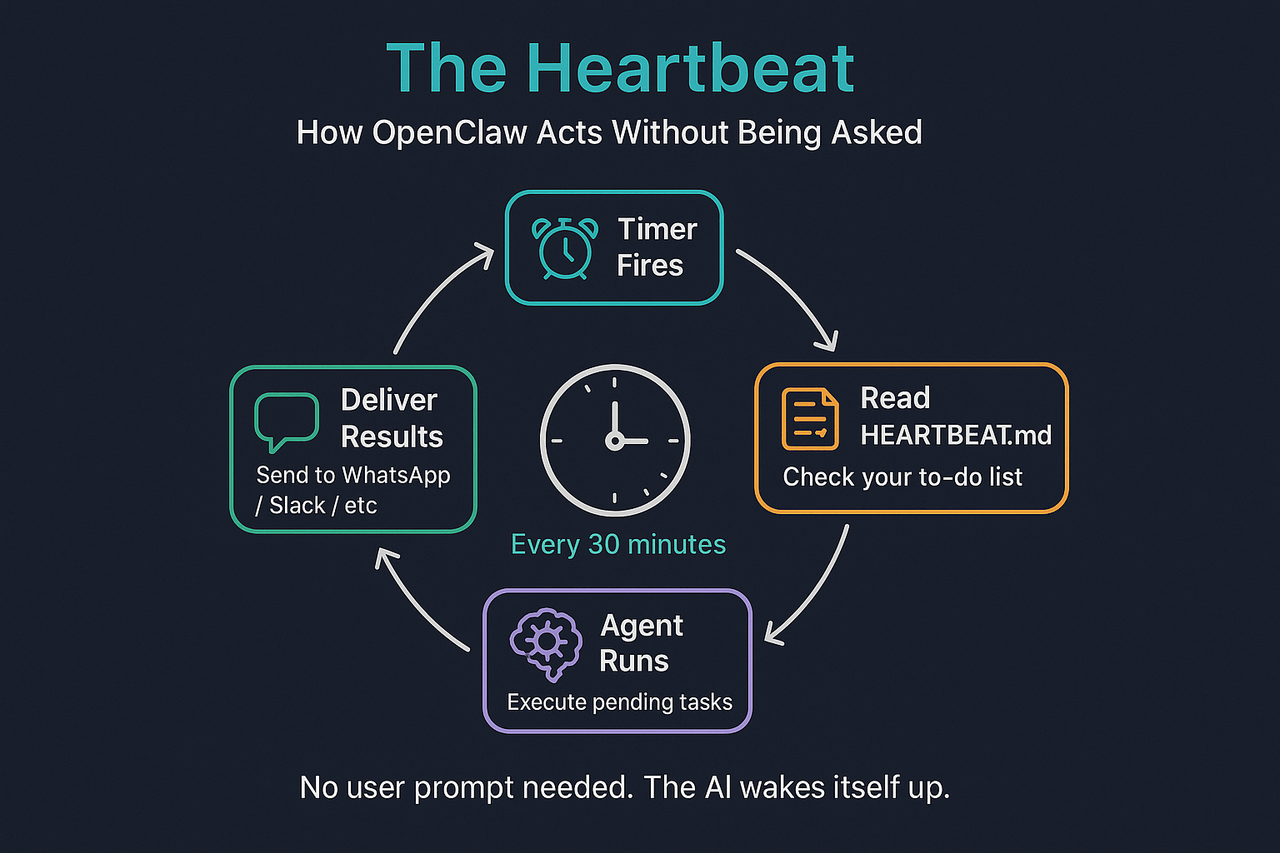
A heartbeat is a periodic agent turn, say every 30 minutes, where the Gateway wakes the model and essentially asks: "Anything need attention?"
Here's what actually happens on each heartbeat tick:
- Timer fires. The Gateway's scheduler triggers a heartbeat for the session.
- The model reads
HEARTBEAT.md. This is a tiny Markdown checklist in the agent's workspace, your "standing orders" for what to check. The agent reviews this checklist every 30 minutes. - Agent runs. The model executes a full turn: it can check inboxes, review pending tasks, read files, search memory, whatever the checklist says.
- Response contract. If nothing needs attention, the model replies
HEARTBEAT_OK, a special token that the Gateway strips and drops silently. You never see it. If something does need attention, the model sends a real message that gets delivered to your configured channel.
A typical HEARTBEAT.md looks like this:
# Heartbeat checklist

- Quick scan: anything urgent in inboxes?
- If it's daytime, do a lightweight check-in if nothing else is pending.
- If a task is blocked, write down what is missing and ask next time.
This design allows the agent to decide whether something is worth surfacing. Most heartbeats end in a silent HEARTBEAT_OK. You only hear from it when it has something to say. That's what creates the "it's keeping an eye on things" feeling without spamming you.
Heartbeats also respect active hours. You can restrict them to business hours so the agent doesn't burn tokens (or bother you) at 3am.
Cron jobs
Cron is the deterministic complement to heartbeat's open-ended triage. Where heartbeat says "look around and decide," cron says "do this specific thing at this specific time."
- "Summarize overnight updates every morning at 7am"
- "Check deployment metrics every hour"
- "Draft the Monday standup post at 8:45am"
Cron jobs can run in two modes:
- Main session: enqueue a system event and run during the next heartbeat, sharing the main conversation context.
- Isolated: spin up a dedicated agent turn in its own session, so the work doesn't clutter your main conversation.
Jobs persist to disk (~/.openclaw/cron/jobs.json), so they survive Gateway restarts. The agent can even create cron jobs itself via the cron tool. "Remind me to check on this in 2 hours" just works.
So "24/7" in practice means:
- Heartbeats for awareness and triage (open-ended, agent-decided)
- Cron for scheduled work (deterministic, time-triggered)
- Messages for on-demand interaction (user-triggered)
Not infinite back-to-back LLM runs. Discrete, bounded agent turns, triggered by events.
Memory: files on disk, searchable by meaning
One of the most underrated parts of OpenClaw's design: the durable memory is plain Markdown files. It uses plain files rather than a database or a pure vector store.
The workspace uses two memory layers:
MEMORY.md: curated long-term memory. Preferences, decisions, durable facts. The agent's "I know who you are and what you care about" file.memory/YYYY-MM-DD.md: daily logs. Append-only notes from each day's interactions. Think of it as the agent's journal.
This is powerful for reasons that aren't immediately obvious:
- Memory survives across sessions. When the agent starts a new turn, it reads today's and yesterday's daily logs. Context carries forward without stuffing everything into the model's context window.
- It's inspectable and editable. You can open
MEMORY.mdin a text editor and see exactly what the agent "knows." You can correct it. You can delete things. Try doing that with a black-box embedding store. - It's version-controllable. OpenClaw recommends putting your workspace in a private git repo. Your agent's memory becomes backed up, diffable, and recoverable.
But plain Markdown alone has a retrieval problem: when the agent needs to find something from three weeks ago, grepping through files won't cut it. So OpenClaw layers vector search on top:
- Memory files are chunked (~400 tokens, 80-token overlap) and embedded using your configured provider (OpenAI, Gemini, Voyage, Mistral, or local GGUF models).
- Search is hybrid, combining BM25 keyword matching (great for exact terms like error strings or IDs) with vector similarity (great for semantic paraphrasing).
- Temporal decay optionally down-weights older notes, so yesterday's context outranks a well-worded note from six months ago.
- A pre-compaction memory flush triggers a silent agent turn before the context window fills up, reminding the model to write durable notes to disk before older messages get summarized away.
The key concept: The model's context window is ephemeral. It gets compacted and summarized as the conversation grows. But the workspace is permanent. The files are the real memory. The context window is the working memory (the agent's "RAM"). The workspace is the "hard drive."
The Gateway as permission boundary
The Gateway acts as both a router and an enforcement layer, defining the boundary between what the agent can do and what it can't.
Channel security:
allowFromwhitelists restrict which phone numbers or accounts can talk to the agent.- Unknown senders trigger a pairing flow: they get a short code and the bot won't process their message until you approve them (
openclaw pairing approve). - Group chats can require mentions (
@openclaw) before the agent responds.
Tool policy:
- The Gateway controls which tools are available per session.
- Non-main sessions (group chats, channels) can run inside Docker sandboxes, per-session containers where bash and file tools are isolated from the host.
- Tool calls can be gated behind approval workflows.
Session isolation:
- Each channel, group, or contact gets its own session with its own conversation history.
- Multi-agent routing lets you run separate agents with different workspaces, models, and permissions. An "ops agent" and a "personal assistant" on the same Gateway.
Even when the agent operates autonomously, messaging you proactively, checking things on a schedule, executing tools, the Gateway enforces security boundaries:
- "You can read files in the workspace"
- "You can't execute shell commands in this group session"
- "You need approval before sending to this channel"
Connecting the dots: the model runs in discrete turns
If you've read our post on Claude Code's ReAct loop, the architecture here maps cleanly.
Claude Code's while loop: Think > Act > Observe > Repeat until done.
OpenClaw's agent runner: the same loop, but triggered by the Gateway instead of a terminal. The Gateway handles orchestration, scheduling, and channel routing. Each wake-up, whether from a message, heartbeat, or cron job, runs a bounded ReAct-style agent turn. The model reasons, calls tools, produces output, and stops. Then the Gateway goes back to waiting.
The key difference: Claude Code is interactive (you're sitting at a terminal). OpenClaw is ambient (the Gateway is always listening, and the model only runs when triggered). But the underlying execution model, stateless model, stateful conversation history, tool-use loop, is identical.
Every agent turn is a full API round-trip. The model doesn't have persistent state between turns beyond what's in the conversation history and workspace files. The Gateway creates the illusion of continuity.
Why this architecture wins
The modern AI employee resembles an operating system scheduling short bursts of reasoning, rather than a model running indefinitely.
That's why OpenClaw (and architectures like it) feel so powerful:
- Always available: the Gateway stays up and connected to your channels, ready to wake the model instantly.
- Proactive when configured: heartbeats and cron create the "it's watching things" feeling without constant inference.
- Durable memory through files: plain Markdown, inspectable, editable, version-controllable, with vector search layered on top.
- Controllable permissions: the Gateway enforces who can talk to the agent, what tools it can use, and where it can send messages.
- Cost-efficient: you only pay for inference when the model actually runs. A heartbeat that returns
HEARTBEAT_OKis one short API call every 30 minutes, not continuous GPU time.
The AI assistant that "never sleeps" is actually an AI assistant that sleeps almost all the time, and has a very good alarm clock.
Case Study: How AI Turned 15 Hours of Legal Review Into 15 Minutes
A real engagement where we used Claude Code to parse 1,271 co-parenting messages from PDF exports, structure them into searchable data, and generate a cited evidence report for discovery. What used to take 15 hours of paralegal work took 15 minutes.
Claude Code Isn't Magic. It's a While Loop with Tools.
A deep dive into what's actually happening under the hood of Claude Code: the ReAct loop, the tool system, the hooks, and why understanding this architecture matters more than using it