Claude Code Isn't Magic. It's a While Loop with Tools.

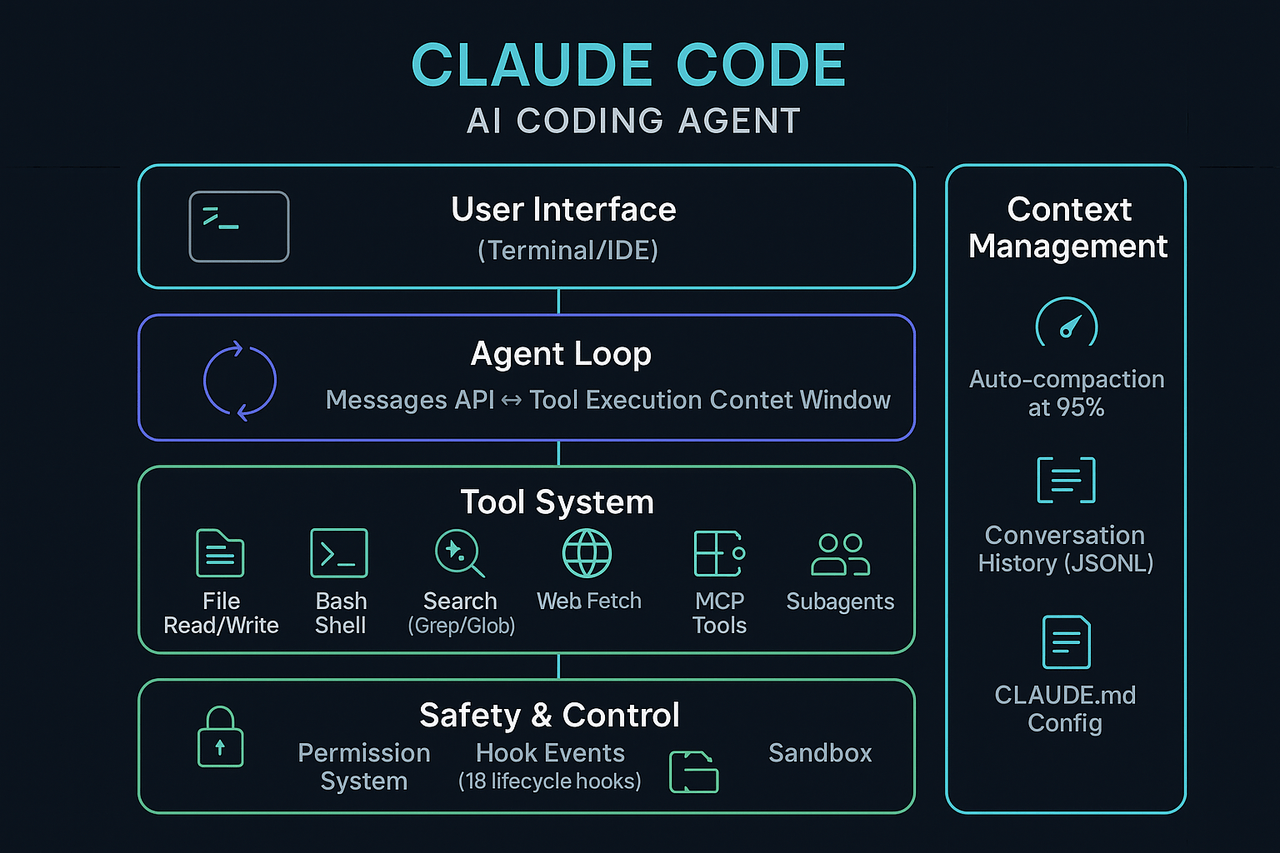
The Thing Nobody Tells You About AI Coding Agents
I've been using Claude Code daily for months now. I've watched senior engineers demo it in meetings and describe what happens as borderline sorcery. I've heard CTOs say things like "it just... figures it out" with a mix of awe and unease. And I get it. When you watch Claude Code refactor an entire module, run the tests, fix the failures, and commit the result, it feels like magic.
But pull back the curtain and you find a while loop. It calls tools. It reads the output. It decides what to do next. When it's done, it stops. That's it. That's the whole thing.
The core insight: Every AI coding agent you've seen (Claude Code, Cursor, Copilot Workspace, Devin) runs on the same fundamental pattern. Once you understand it in one, you understand them all.
Understanding this architecture makes you someone who can evaluate these tools, extend them, and build on top of them. If you're an engineering leader making buy-or-build decisions about AI tooling, this knowledge separates informed strategy from expensive guesswork.
The ReAct Loop: AI's Simplest Powerful Idea
The architecture behind Claude Code is called a ReAct loop, short for "Reasoning + Acting." The academic paper dropped in 2022, and the idea is almost disappointingly simple: let the model think about what to do, do it, observe the result, and repeat.
Here's the mental model:
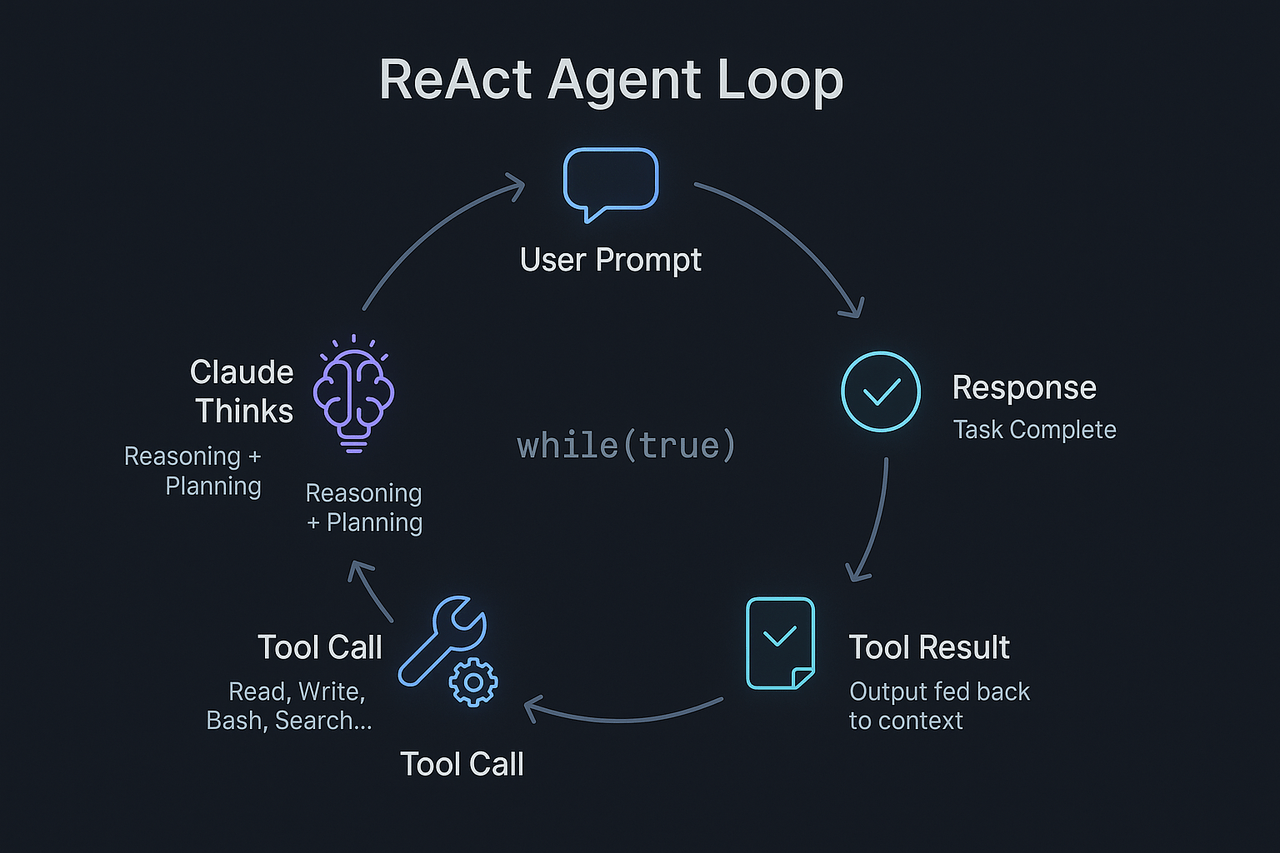
In pseudocode, the entire architecture looks like this:
while (stop_reason !== "end_turn") {
  response = await claude.messages.create({
    messages: conversationHistory,
    tools: availableTools
  })

  if (response.stop_reason === "tool_use") {
    for (toolCall of response.tool_use_blocks) {
      result = await executeTool(toolCall)
      conversationHistory.push(toolResult(result))
    }
  }
}
That's the skeleton of a billion-dollar product. The loop itself is trivial. What fills it is what matters.
The Anthropic Messages API has a stop_reason field on every response. When Claude wants to use a tool, it returns stop_reason: "tool_use" along with structured tool_use content blocks specifying which tool and what arguments. The client executes the tool locally, packages the result as a tool_result message, appends it to the conversation, and calls the API again. When Claude decides the task is complete, it returns stop_reason: "end_turn" and the loop exits.
Every iteration of this loop is a full API round-trip. Claude doesn't have a persistent process running on a server somewhere. It wakes up, sees the full conversation history, reasons about it, and acts. Then it goes to sleep. Every single time.
This is a crucial detail that most people miss. There's no hidden state. No memory between calls beyond what's explicitly in the conversation. The model is stateless. The loop creates the illusion of continuity.
The Tool System: Hands for the Brain
The loop is useless without tools. A model that can only think but never act is just an expensive rubber duck. Claude Code ships with a carefully curated set of built-in tools that give it hands:
File Operations
Read: read files from diskWrite: create or overwrite filesEdit: surgical string replacementsNotebookEdit: modify Jupyter cells
Search & Navigate
Grep: regex search across filesGlob: pattern-based file findingLSP: code intelligence via language serversWebSearch/WebFetch: internet access
Execute & Orchestrate
Bash: run shell commandsAgent: spawn subagentsTaskCreate/TaskUpdate: manage task listsMCP Tools: extensible via plugins
Each tool is defined with a structured input schema and capability metadata (is it read-only? destructive? safe for concurrency?), then exposed to the model through the tools parameter on API requests.
Here's what's interesting: Claude doesn't pick tools from a dropdown. The tool definitions (names, descriptions, input schemas) are part of the system prompt. Claude reads them the way you'd read an API reference, then generates structured JSON to invoke them. If the JSON doesn't match the schema, validation catches it. If the tool doesn't exist, it gets an error back. The model learns from these errors in-context and self-corrects.
The extensibility play: Beyond built-in tools, Claude Code supports MCP (Model Context Protocol) tools, an open standard for plugging in external capabilities. Any MCP server you connect gets its tools automatically available to the agent, following the naming pattern
mcp__servername__toolname. This is how you get database access, GitHub integration, or custom internal tools without modifying Claude Code itself.
What a Real Session Looks Like
Let me walk you through what actually happens when you type something like "add pagination to the users endpoint" into Claude Code. No hand-waving, just the API calls.
Turn 1: Your prompt goes to the API. Claude comes back with stop_reason: "tool_use" and a Grep call searching for the users endpoint.
Turn 2: The grep results go back as a tool_result. Claude now knows the file and line. It responds with a Read call to get the full file.
Turn 3: File contents come back. Claude reasons about the structure, then generates an Edit tool call with the exact string replacement to add pagination parameters.
Turn 4: Edit confirmation comes back. Claude calls Bash to run the tests.
Turn 5: Test output comes back with two failures. Claude reads the error messages, generates two more Edit calls to fix the test expectations.
Turn 6: Another Bash call to rerun tests. They pass. Claude returns stop_reason: "end_turn" with a summary.
Six API round-trips. Six iterations of the loop. Each one is observe-think-act. A systematic process that happens to be powered by a model that's genuinely good at reasoning about code.
The key insight for engineering leaders: This is fundamentally a serial process. Each loop iteration requires an API round-trip, and an iteration may contain one or more tool calls. Complex tasks might require 20-50 iterations. That's 20-50 API calls, each with the full conversation context. Understanding this explains both the capability (it can do remarkably complex things) and the limitations (it's not instant, it costs real money per iteration, and it can go off the rails if early decisions are wrong).
The Permission and Hook System: Where It Gets Serious
Here's where Claude Code separates itself from a weekend hackathon project. The hook system is essentially aspect-oriented programming for an AI agent: 17 lifecycle events that let you intercept, modify, or block what the agent does at each stage.
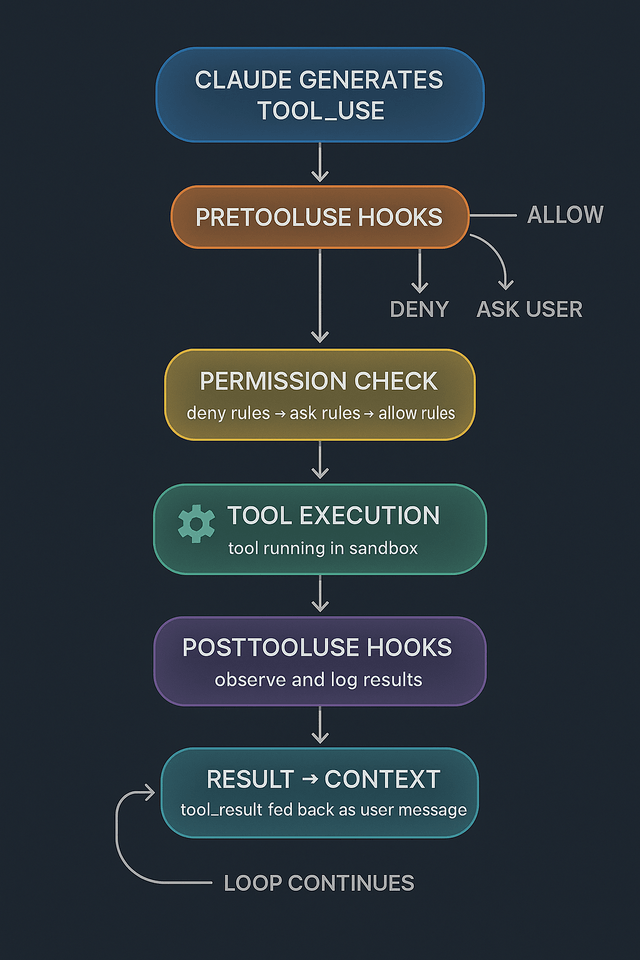
Every tool call passes through a gauntlet:
- PreToolUse hooks fire. These can inspect the tool name and arguments, then return
allow(bypass all permissions),deny(block it), orask(prompt the user). They can even modify the tool's input before execution. - Permission rules evaluate. A three-tier system: deny rules are checked first, then ask rules, then allow rules. First match wins. Rules support glob patterns:
Bash(npm run test *)allows any test command,Read(./.env)blocks env file reads. - Execution can run inside a sandbox. Bash commands can be sandboxed with OS-level filesystem and network controls when enabled, while tool usage is also governed by permission rules and hooks.
- PostToolUse hooks fire. These observe the result and can trigger additional behavior.
And there's a hook that might be the most architecturally interesting of all: the Stop hook. It fires when Claude decides it's done. If the hook returns decision: "block", Claude keeps going with the hook's reason injected as its next instruction. This is how you build autonomous loops, quality gates, and "don't stop until the tests pass" behaviors on top of the base agent.
Four types of hooks
- Command hooks: shell scripts, receive JSON via stdin
- HTTP hooks: POST to a URL endpoint
- Prompt hooks: route to a cheap, fast LLM (Haiku) for single-turn judgment
- Agent hooks: spawn a full subagent with tool access to verify conditions
The prompt and agent hook types deserve special attention. They implement LLM-as-judge, using a separate, cheaper model to evaluate whether the main agent's actions are acceptable. Your security policy doesn't have to be a regex. It can be a natural language instruction: "Block any tool call that would modify files in the /production directory unless the user explicitly mentioned production deployment."
Context Management: The Constraint Everyone Ignores
Here's a detail that matters enormously in practice and almost nobody talks about: the context window is finite, and every iteration of the loop makes it bigger.
Each turn of the loop appends the tool call and its result to the conversation history. Read a 500-line file? That's 500 lines now permanently in the conversation. Run a test suite with verbose output? All of it goes into context. After 20-30 tool calls on a complex task, you can easily be pushing against the limits.
Claude Code handles this with auto-compaction. When the context window fills to approximately 95% capacity, a PreCompact hook fires, then the system summarizes the conversation, distilling the full history into a compressed representation that preserves the important bits. It's like the model taking notes and then starting a fresh conversation with those notes as context.
Why this matters for your workflow: Long, complex tasks don't fail gracefully when context runs out. They fail weirdly. The model starts forgetting early decisions, contradicting itself, or re-reading files it already read. Understanding the context constraint helps you structure tasks into smaller, focused chunks instead of one massive prompt. The best Claude Code users work with the loop, not against it.
Additional context management mechanisms:
- Subagent isolation. When Claude spawns a subagent (the
Agenttool), that subagent gets its own context window. The parent only receives a summary of the subagent's work. This is how Claude Code handles tasks that would otherwise blow the context budget. - Result truncation. Oversized tool results get persisted to disk and replaced with a pointer. The model can request specific sections if it needs more detail.
- CLAUDE.md files. A hierarchical system of markdown files that inject persistent instructions without consuming conversation turns. Global settings, project conventions, and personal preferences all live here, loaded once at session start, always available.
Subagents: Recursion with a Safety Net
One of the more elegant design decisions: Claude Code can spawn copies of itself. The Agent tool creates a subagent, a nested instance with its own context window, tools, and conversation history. This is how it handles complex tasks that require parallel exploration or would overwhelm a single context window.
But there's a critical constraint: subagents cannot spawn other subagents. One level of nesting, max. This prevents the kind of recursive explosion that would turn your API bill into a phone number. Each subagent also has configurable limits (max turns, available tools, permission modes) so the parent agent can scope the child's capabilities precisely.
The built-in subagent types reveal the design philosophy:
- Explore (uses Haiku, fast and cheap): read-only. Can search and read files but can't modify anything. Used when the agent needs to understand a codebase before making changes. Keeps costs low for the reconnaissance phase.
- Plan (research first): research and design the approach before writing any code. Useful for complex tasks where the wrong initial direction wastes expensive context window on backtracking.
Why This Matters If You're Not Building AI Tools
You might be reading this thinking "cool architecture deep dive, but I'm not building an AI coding agent." Fair. Here's why this still matters:
If you're evaluating AI tools for your team, you now know the right questions to ask. How does the agent handle context limits? What's the permission model? Can you hook into the lifecycle? How are tool results fed back? These aren't academic questions. They determine whether the tool is trustworthy enough for production codebases.
If you're an engineering leader, understanding this architecture demystifies the cost model. Each loop iteration is an API round-trip with full conversation context. More complex tasks mean more iterations, more tokens, higher costs. You can now estimate costs based on task complexity, not vibes.
If you're building with AI, the ReAct pattern is the foundational architecture for every agent system shipping today. The specifics vary across implementations, but the loop is the same. Understanding it in Claude Code gives you a mental model that transfers everywhere.
The uncomfortable truth for the AI-skeptical: The architecture behind these tools is not complicated. A senior engineer could build a basic version in a weekend. What makes them powerful is the model's reasoning capability, the quality of the tool implementations, and the depth of the safety systems. The magic was always in the weights, not the code.
The uncomfortable truth for the AI-enthusiastic: These tools have real, architectural constraints. Context windows are finite. Each iteration costs money and time. The agent can go off the rails. Understanding the architecture helps you work within those constraints instead of being surprised by them.
The Architecture in One Sentence
Claude Code is an event-driven while loop that calls the Anthropic Messages API, executes tool calls locally, feeds results back into the conversation, and repeats until the model decides it's done. All of that wrapped in a permission system, hook lifecycle, and context management layer that makes it safe enough to point at a production codebase.
That's it. No magic. Just good engineering on top of a powerful model.
The teams and leaders who understand this, really understand it and not just as an "AI is a while loop" hot take, are the ones who will build the most effective AI-augmented engineering organizations. The architecture isn't secret. Most people just never bother to look.
Demystifying AI tools doesn't make them less useful.
It makes you more dangerous with them.
OpenClaw: The Architecture Behind the Always-On AI
Exploring how OpenClaw creates a persistent AI assistant experience using an event-driven Gateway architecture rather than a continuously running model.
Why Backend AI Beats Frontend AI for Enterprise Value
The unsexy, invisible AI implementations that actually drive ROI—and why the flashiest features are often the worst investments