Your Website Might Be Invisible to AI

The Restaurant That Wasn't There
A friend asked me to look into why their restaurant group's website never showed up when people asked ChatGPT or Perplexity for dining recommendations in their area. They had four locations, good reviews, an updated menu, hours, the whole package. The site looked great in a browser. Then I looked under the hood.
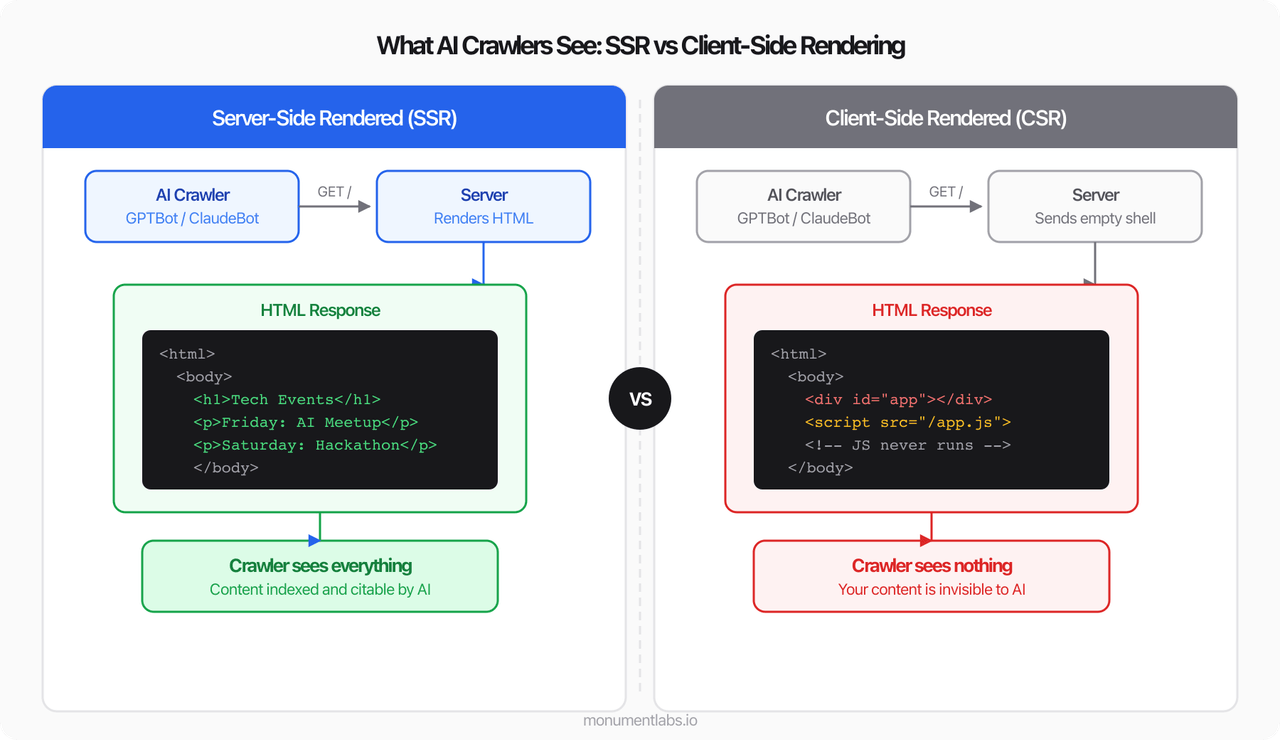
The server wasn't sending the actual content of the website. It was sending a blank page along with a JavaScript program that tells the visitor's browser to build the page on their end. For a person using Chrome or Safari, this works fine. For an AI system trying to read the page? There's nothing there.
I asked ChatGPT to recommend restaurants in their area with outdoor seating. They weren't in the answer. I asked Claude. Same result. The restaurant existed for people who already knew the URL. For the growing number of people who discover businesses through AI, it was invisible.
Why This Happens
There are two ways a website can deliver content. The first is straightforward: the server builds the page and sends it as a complete document. When anything requests that page, whether it's a browser, a search engine, or an AI crawler, the content is right there in the response.
The second approach is more indirect: the server sends a mostly empty page along with a JavaScript program. The visitor's browser runs that program, fetches the data, and assembles the page on screen. The end result looks the same to a human, but anything that doesn't run JavaScript sees a blank page.
That second approach, called client-side rendering, has been popular with web developers for years. It worked well enough when Google was the only non-human reader that mattered, because Google invested in the infrastructure to run JavaScript. But the web has new readers now, and they aren't as capable.
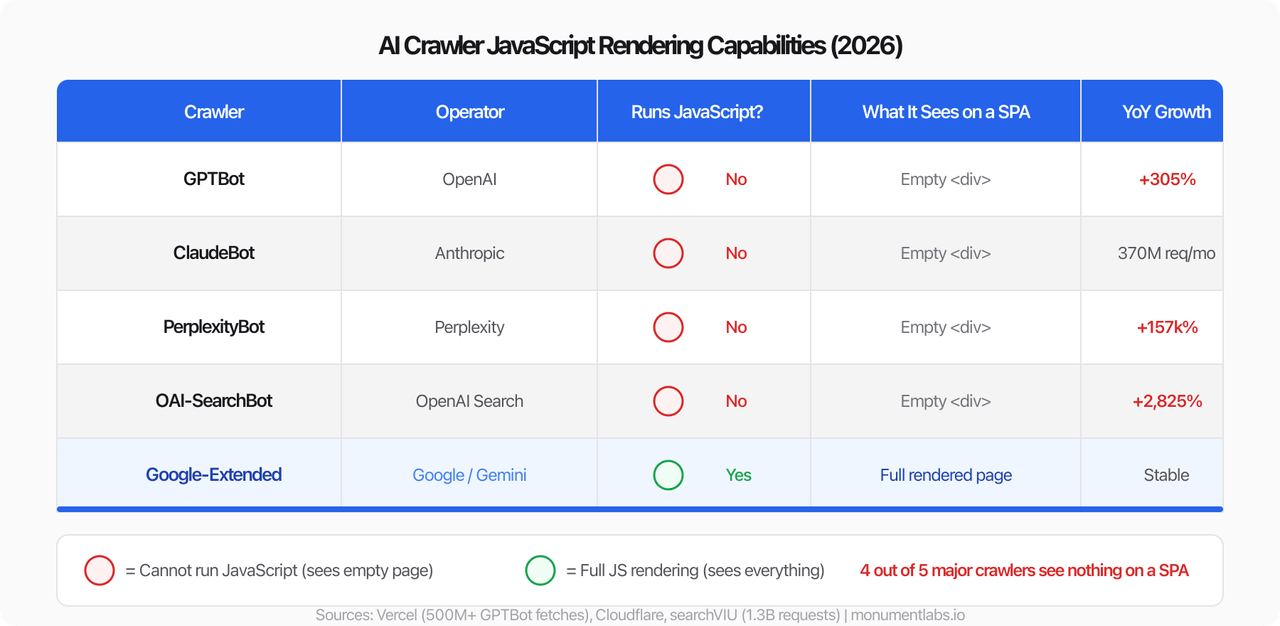
This isn't a niche technical detail. An analysis of over 500 million requests from OpenAI's crawler found zero evidence of JavaScript execution. A broader study across 1.3 billion AI crawler requests found that the majority of them can't run JavaScript at all. Google is the exception, not the rule.
Why It Matters More Than You'd Think
With traditional search engines, poor visibility meant ranking lower. You'd show up on page three instead of page one. Not ideal, but you were still in the index somewhere.
AI visibility works differently. When someone asks an AI assistant to recommend a restaurant, compare products, or research a topic, the AI assembles its answer from whatever it can access right now. If it can't read your site, you aren't ranked lower in the response. You aren't in the response. The user gets their answer, feels satisfied, and moves on without ever knowing you existed.
This also compounds silently. A drop in Google rankings shows up in dashboards and triggers conversations. AI invisibility produces no signal at all. The traffic from AI-driven discovery simply never materializes, and there's no way to notice what you're missing.
Worth noting: Your site can rank well on Google while being completely invisible to ChatGPT, Claude, and Perplexity. Google ranking is no longer a reliable proxy for overall discoverability. These AI systems operate their own crawlers independently, and most of them don't have Google's JavaScript rendering capabilities.
Who Should Be Paying Attention
Businesses whose sites were built by agencies or on platforms like Bubble, or similar app-building tools. Many of these produce JavaScript-heavy sites by default. If nobody on your team has specifically thought about how the site delivers HTML, it's worth checking.
Organizations with content that's meant to be discovered: product catalogs, service pages, event listings, directories, resource libraries. If this content lives behind a JavaScript rendering layer, it's effectively hidden from the fastest-growing discovery channel on the internet.
Anyone whose site was built as a "web app" rather than a "website." There's a meaningful architectural distinction between the two, and many sites that serve public information were built with the wrong approach.
The Fix Is Smaller Than You Think
Here's the part that makes this worth writing about: fixing this is usually not a major project. The most popular web development frameworks (Next.js, Nuxt, SvelteKit, Astro) all support server-side rendering out of the box. Most of them default to it. Enabling it is typically a single setting in a configuration file. For teams already using one of these frameworks, it's closer to flipping a switch than rewriting a codebase.
If your site was custom-built, the conversation with your development team is straightforward: "We need the server to send complete HTML instead of relying on JavaScript to build the page." In most cases, that's a bounded, well-understood change.
If your site is on a platform that doesn't give you control over how pages are rendered, that's a more important conversation to have with your provider. Ask them directly: "Does our site deliver content in the initial HTML, or does it depend on JavaScript?"
Check Your Site in 30 Seconds
You don't need to be technical to test this. There are free tools that will do it for you.
Use an AI Crawlability Checker
LLMrefs offers a free tool that simulates how ChatGPT's crawler sees your page. Paste in your URL, hit analyze, and it will tell you whether your site is server-rendered or client-rendered, along with what content the crawler can and can't see. No signup required.
For a more visual comparison, searchVIU's rendering check shows you what your page looks like to a crawler versus what it looks like in a browser, side by side.
The bottom line:
The cost of making your content visible to AI is usually measured in hours. The cost of staying invisible compounds every day, every time someone asks an AI a question your site could have answered. There's no warning, no analytics alert, and no ranking drop to notice. The opportunities just go to whoever was serving their content in a format AI could read.
If you're unsure whether your site has this problem, run the check above. If it does, talk to your development team. The fix is almost certainly smaller than you'd expect.
Erasing and Repainting an AI Writing Voice
Our content pipeline kept publishing posts that readers flagged as AI-generated. The grammar was clean, the facts were right, nobody cared. What it took to fix the voice, and a surprise about where 'more passes' stops helping.
Case Study: How AI Turned 15 Hours of Legal Review Into 15 Minutes
A real engagement where we used Claude Code to parse 1,271 co-parenting messages from PDF exports, structure them into searchable data, and generate a cited evidence report for discovery. What used to take 15 hours of paralegal work took 15 minutes.